Showing posts with label gm tech2 scanner. Show all posts

Monday, 19 November 2018

How to get GM TECH2 CANdi module to work?

355The Candi Module should not plugged into your GM TECH2 unless you're working on a later car ..generally 2005 plus. Olders car from 96 should NOT have the Candi Module attached.

OBD I only has 1 ground, so 12 pin adapter connects signal and chassis ground to the Tech 2 cable.

OBD II has chassis and signal ground and they are connected in the cars wiring.

How I was trying to get GM TECH2 CANdi module to work:
Nothing on CANdi end of cable.
get-gm-tech2-candi-module-to-work-01


Boot screen not showing CANdi present, diagnostics for CANdi says it isn't seen.
get-gm-tech2-candi-module-to-work-02


Here I connected OBD I adapter to end of CANdi cable:
OBD I adapter connected.
get-gm-tech2-candi-module-to-work-03


CANdi module shows up at boot screen.
get-gm-tech2-candi-module-to-work-04


Green LED flashes about once every second.
get-gm-tech2-candi-module-to-work-05


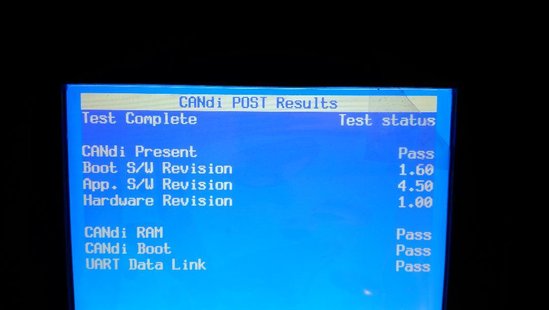
Diagnostic screens for CANdi now present. Hit ENTER, 4, 7 to get to this screen.
get-gm-tech2-candi-module-to-work-06


POST Results.
get-gm-tech2-candi-module-to-work-07

Self Test Results.
The weird looking screen is because I have not removed the protective plastic yet.
get-gm-tech2-candi-module-to-work-08


http://blog.obd2shop.co.uk/how-to-get-gm-tech2-candi-module-to-work/


How to Configure GM MDI 2 Wireless Connection Settings?

This is a guide on how to configure GM MDI 2 Multiple Diagnostic Interface wireless connection settings. 4 steps to easy finish. 1. Connect ...