Showing posts with label gm tech2. Show all posts

Thursday, 14 May 2020

2002 GMC Sierra Scan Tool or Diagnostic Tool you use - pros and cons

Car model and year: 2002 GMC Sierra 1500

Purpose: to pull codes

Scan Tool or Diagnostic Tool to use - pros and cons

1. GM Tech2 pros and cons
To do work on gm stuff I have knock off Tech2. I like it.

2. My OBD Link MX+ or Konnwei Bluetooth devices with the usual Dash Command, Torque Pro, OBD Link and Motor Data apps work for me for troubleshooting.

For us LS engine swap people that don't like to pay the HP Tuners folks money to license a new operating system, there are now free alternatives. "Tuner Pro RT" software allows the free editing of a General Motors PCM operating system to get it to work in a swapped vehicle. Then we use "LS Droid" software with my MX+ device to actually write the changed Tuner Pro operating system to the PCM which completely avoids spending money on HP Tuners.

3.
For a long time I have gotten by with a simple scanner. These days with the Bluetooth devices and the torque app...that is even easier for basic stuff. Back in 2011 I picked up an Innova 3150 which had the ability to read ABS and SRS system faults. It was about $150 then. Current ad for this older tool shows $220...not sure why xxxx
I have considered a clone Tech2 and or the MDI device I have seen mentioned. My main concern other than the $300 cost...which is not bad for what it does....was that I did not want to somehow brick my ECU or any other module either due to the clone tool or my lack of knowledge of using one of these more sophisticated diagnostic tools.

I decided to get one that would perform the ABS bleed, mainly because I like to flush the brake fluid ever few years. What I ran across for the least $$ to fit what I was looking for is the Foxwell NT630 Plus. Listing made an offer to another listing but they would not budge. (why do they show make an offer if they only will drop a dollar?!). The one https://www.obd2shop.co.uk/wholesale/foxwell-nt680plus-scanner.html

Currently my plan is to sell the Innova locally and try and recoup most of the cost of the new tool.

4. My 2001 GMC truck has a problem with the red brake warning light and the yellow ABS lights randomly coming on at the same time. I wanted to find out what code was being set. I quickly learned the local auto parts stores couldn't read ABS codes. I also learned that the repair shops in my area charged $35-$59 just to use their scanner to check for ABS codes. I thought that was too much for a 5 minute scan so I decided to buy a scan tool that would read ABS and SRS codes as well as OBDII codes. Over the course of several weeks I have purchased three scan tools and returned each one of them for a refund for reasons I will describe below

What I wanted a scan tool to do.
I initially set out to find a scan tool that would read ABS, SRS and OBDII codes on all my vehicles, a 1999 S10 Blazer, a 2001 GMC Sierra, a 2012 Equinox and my daughters. 2009 Camry. I wanted to spend no more than $125. I know that sounds like a lot to hope for but I figured I might be able to do it.

Then I confirmed Tech2 is able to do ABS Brake Automated Bleed & Pressure Bleed for Chevy & GMC. Just google " GMC Sierra 2002 Tech2" and you will see a Youtube video on how to do.

5.
Question: Will this 
https://www.obd2shop.co.uk/wholesale/cheap-tech2-with-caton-box-with-card-d.html
work with my 2012 GMC Sierra 1500. Will I be able to calibrate the BPP sensor out of the box? Thanks!

Reply:
If you scroll down further it lists it as going to 2013. I bought one like this and it has been great to diag and repair everything. Too bad it doesn't work on my camaro(MDI).
Could be, but there was an updated 32MB card that supported up to '13.

Or get a Jbox or an MDI2 as it can do anything a tech 2 can and much more. I can go into much more detail if needed but don’t buy a tech 2 it’s outdated and obsolete as of 2013 at best. I have 4 scan tools ranging from 300-5000$ and you can easily spend 500 or less and do anything I can.

It’s called the open port 2.0. It is compatible with GM’s programming website called SPS. That tells me it’s a go for the tech 2 win program which is a laptop version of the handheld tech 2. It also would work with GDS2 which is the current diag tool via laptop for GM. Then you can lease the use of the software as needed.
https://www.acdelcotds.com/acdelco/action/subscribehome This is The site to lease the programs. It may not make since for some people but if you are devoted to “doing it yourself” it’s the only way, end of story. You will use other software to diag the problem and then slide over to gm’s stuff if needed but this will give you the widest range of functionality.

http://blog.obd2shop.co.uk/2002-gmc-sierra-scan-tool-or-diagnostic-tool-you-use-pros-and-cons/

Monday, 20 April 2020

Reviews: GM MDI vs VCX Nano GM diagnostic cable

What's the difference among GM MDI, VCX Nano GM cable & Tech2, other than price, and what's the similarity?

@ Dcasole review:
None the MDI and the nano are just pass tru devices used to communicate with the car when using TECH II WIN

Make sure the VCX nano comes with software otherwise you will have to buy a license

I have one and use the GDS2 software for my C7 and the Tech II win for all my buddies C6 ...came with hacked software that runs in a VM machine.

Mine came on a CD, I know why they offer it on a hard drive
The software can be a challenge to load if you don't know what you are doing

Tech II win and GDS2 was built to run on a 32 bit Windows 7 machine

I was able to get TECH ll Win to run on my Windows 10 64 bit machine but it's a crapshoot, some can't get it to run on Windows 10
I never got GDS2 to run in windows 10

There are not many of those old laptops around that have enough power to run the software so they give you a copy of VM ware ( virtual machine) and a copy of Windows 7 with all the software loaded so when you start the VM session, Windows 7 starts inside this shell and then you click on GDS2 for later cars or TECH II WIN for earlier models

So not to many people know how to load and run VM ware that is why they just copied all the software to a hard drive for you and then you just make a shortcut to your windows 10 desktop
Now its still not all plug and play as you need to allow VM ware Access to your USB ports etc which is not hard to do
You also need good hardware as VM ware uses a lot of resources
I tried it on an old Core Duo laptop and it was just to slow and crashed a lot
I bought an old Dell laptop Icore 5 with 16 gig of memory running Windows 10 and it runs the VM machine great

I bought my NANO from obd2shop.co.uk figuring if I could not get it to run I would just send it back. After about a week of messing with it I now have it running both flawlessly, stick with the USB version as the wireless version is just one more thing to complicate the install. The cable is not bad to use at all
VXDIAG VCX Nano GDS2 and Tech2Win...

So for $129 for the device and another $130 for the cheap laptop ......no trips to the dealer for me or my buddies ...I love it

@ Dcasole review:
The Tech II win running with vxdiag nano is the same exact software as what is on your Tech II hand held unit.
I had a Tech II knockoff but sold it when I got my C7. I was spoiled so now I wanted a GM MDI pass thru so I could work on my C7. That's when I decided to try the VX NANO .. Works great now that I got it running and having TECH II WIN is a bonus...

There is no better tool than a TECH II or GDS for diagnosing issues or accessing modules.

@ wjnjr review:
I agree. And with the prices now you can get a Tech2 or a VCX Nano & laptop setup for the same or less $$$ than the better 3rd party scan tools which won't do as much.

To be upgrading...

http://blog.obd2shop.co.uk/reviews-on-the-difference-among-gm-mdi-vcx-nano-tech2/

Monday, 16 March 2020

Tech2 Clone ensure Corvette C6 steering wheel at zero ... and more

Device: GM Tech2 Clone 

Car: Corvette C6 2005- 2013

Feedback:
1. First Impressions
this scan tool is a massive beast, in the pictures, it looks smaller but damn! This thing is hefty and looks like one of that TV walkman's from the 80's. hahaha

2. It can do so so much more than a simple OBD2 scanner: 
The overall technical ability of this GM Tech2 Clone is amazing, I bought it to ensure my steering wheel was at zero after steering rack removal for a harmonic balancer; works great! After pulling DTCs from every single module in the car, I soon realized I had fault codes that a regular OBDII reader would never capture which is pretty awesome!

While playing around with it more, I found where you can adjust the engine idle RPM speed and adjusted it up to 625 from the pre-set 550 RPM. This minor adjustment to the idle speed actually made my Corsa Sport exhaust sound more throaty and aggressive at idle, you should try it. I wouldn't think this small idle adjustment would damage anything.

FYI, I purchased Tech2 Clone came with the latest GM software version 33. something...This version covers GM vehicles up to 2013. Keep in mind the Tech2 is only a diagnostic tool, used to test different modules and perform numerous tests as well as special functions that are extremely useful. If you want to program or re-flash a module such as the BCM, the Tech2 serves as a pass-thru device and you need a subscription from the AC Delco website to perform calibrations or updates to modules.

Read: SPS programming procedure

tech2-clone-corvette-c6-sps-programming-01

tech2-clone-corvette-c6-sps-programming-02


A word: Tech2 Clone can do so much more than a simple OBD2 scanner.
Enjoy!

www.obd2shop.co.uk

Thursday, 27 February 2020

Valuable one year online gm programming with SPS GDS2 Tech2Win

Look at One-year Online GM programming subscription:
http://www.obd2shop.co.uk/wholesale/one-year-gm-online-subscription-for-mdi-tech2.html
one-year-online-gm-programming
Contained:
1. Programming: Tech2Win (Tech2 Software Emulator for PC)
2. SPS Programming Software Unlimited VIN
3. Diagnostics: GDS2 (Global Diagnostic System - Global Diagnostic Package), offline

Compatible with:
GM MDI
GM Tech2
VXDIAG VCX Nano GM
VCMII
other J2534 devices

Remote make online programming:
Within one year, the dealer will arrange engineers to help remote make online programming via Teamviewer.
Note: Please keep using on one laptop, otherwise account will be blocked.

Watch video on GM SPS programming procedure:

The above source of One-year Online GM programming subscription is the value of money. please read the following paragraphs and you will agree with me:
GM Diagnostic software you can install it ( Tech2win and GDS2 but SPS Programming needs a different subscription ( at least in opel-infotech ) and it can be done only online. NO offline.
Go in their official page. Choose Register and follow the steps.

SPS PROGRAMMING is ONLY ONLINE
For Europe you have to:
1. Register in opel-infotech.com or vauxhall-infotech.com
2. Buy a subscription
a. Chevy SPS Programming 35-40€/2 hours
b. OPEL SPS Programming 35-40€/2 hours
c. CHEVY GDS2 - 120€/year
d. OPEL GDS2- 120€/year
e. OPEL TECH2WIN OPEL- 125€/3 months
f. CHEVY TECH2WIN HHR 125€/months
For each subscription, you have to pay a subscription and a fee
When you will buy the first time a subscription you have to buy a subscription you will also have to pay 35€+ fees more.
I think I don't pass anything because I write from my memory.

If you will use the Search button you will find software's to install it in normal/native windows.
But you will need a license.
If you are using Global Tis v32 you can install and activate Tech2win and GDS2 in native/normal windows and you don't need to pay any fee.
Tech2win do not cover any SPS Programming
GDS2 do not cover any SPS Programming

3. Tech2win do not support SAAB
Only GDS2 cover SAAB between 2010-2012
For SAAB you need Tech2 handheld tool
There is a patched SAAB PCMCIA for Tech2win but this will not work well but only (maybe) in 9-3 Sport as I remember.

http://blog.obd2shop.co.uk/valuable-one-year-online-gm-programming-with-sps-gds2-tech2win/

Wednesday, 26 February 2020

How to setup GM Tech2 Tis2000 patch?

This article is on why need to crack Tis2000 software and how to crack TIS2000 for GM / Opel.

Why need to crack GM Tech2 Tis2000
For GM Opel tis2000: use D630 computer, you can insert the USB dongle to use or use the patch to crack.
For Saab TIS2000: usually use IBM T30, for other computer you may get error message, need to insert the USB dongle, can't use the patch to crack.

How to crack TIS2000 for GM / Opel:
Part 1: Insert CD2.
Insert TIS2000 CD into the computer, open DVD.
Open "AUTORUN" to setup.
crack-tis2000-01

crack-tis2000-02


Next.
Select language.
Next;
COM1.
Standalone;
NAO;
crack-tis2000-03

crack-tis2000-04

crack-tis2000-05

Tick "Click here to add", then "Continue".
crack-tis2000-06


Click on "Ok".
M3311: the program has finished.
Please attach the USB security key to the PC in order to complete the process.
crack-tis2000-07

crack-tis2000-08


TIS2000 Transbase and ODBC installation.
M723: TIS2000 successfully updated.
crack-tis2000-09

crack-tis2000-10


Part 2: Insert CD2.
M723: Tis2000 successfully updated.
crack-tis2000-11

crack-tis2000-12


Part 3: Insert CD3.
Open the cd, then "TIS2000 patch" to copy "SuperPro.dll".
Right-click on "TIS 2000", then "Find "Find target", then paste "SuperPro.dll" here.
crack-tis2000-13

crack-tis2000-14


Part 4: open TIS2000.
Enter the "Service Programming system".

crack-tis2000-15

crack-tis2000-16

crack-tis2000-17

Done.

Note: If you done by following the above procedure one by one, you won't get error " E666: Access to Service Programming Server was denied".
crack-tis2000-18


Good luck

Tis2000 tech support: www.obd2shop.co.uk

Wednesday, 3 July 2019

Corvette C6 service programming in 2 methods

Corvette C6 service programming in 2 methods:
1. TIS2000 running with GM Tech2
2. went to the website, downloaded the java app they supply (that contains your paid subscription information so it'll run), and ran it. All I used was a web browser and I re-initialized PCMs.

In details...
1. TIS2000 running with GM Tech2 for Corvette C6 SPS programming
Tis2000 is only used for SPS programming, and the Tech II is put into pass-through mode when using such.
On export vets, you have to use SPS programming for programming in fobs, since the key in the cylinder does not work on them.
Op. You can always call ACDelcoTDS and ask them pre-sales questions on what you really need. There's no cost to ask and they do have real humans answering the phones who know what's up.

How to install Crack TIS2000 on XP?
As for Tis2000, need to run under XP,.
So the short version, build a VM shell in XP with something like VM work station on your win 10 machine, load the three discs to the VM shell, install the crack, then build the driver.

If your laptop does not have an RS232 port, then will need to buy the needed usb cable to connect the Tech II to the laptop, and make sure to install the needed USB driver into the XP shell as well.
Drivers are listed about half way down on the page.
https://www.automationdirect.com/adc/Shopping/Catalog/Communications/Serial/Industrial_USB/USB-RS232;jsessionid=CA26EE08559E554AA707790537515048 

As for the cracked Tis2000 (all three disc's and dongle crack), pretty easy to find for free on the web with a search to download it for free.

As for what came with the clone, some users consider it is just a PDF file, actually it is a file that needs to be decompressed with something like 7-zip to produce the three iso's and the dongle crack folder with instructions.

A/C Delco TDS online is not a bad thing, and only $40 per vin/car for two year period.
On the other hand, Tis2000 cracked can be mod'd to do SPS programming on any car up to 2013 for free instead.

Enjoy.

www.obd2shop.co.uk

Monday, 19 November 2018

How to get GM TECH2 CANdi module to work?

355The Candi Module should not plugged into your GM TECH2 unless you're working on a later car ..generally 2005 plus. Olders car from 96 should NOT have the Candi Module attached.

OBD I only has 1 ground, so 12 pin adapter connects signal and chassis ground to the Tech 2 cable.

OBD II has chassis and signal ground and they are connected in the cars wiring.

How I was trying to get GM TECH2 CANdi module to work:
Nothing on CANdi end of cable.
get-gm-tech2-candi-module-to-work-01


Boot screen not showing CANdi present, diagnostics for CANdi says it isn't seen.
get-gm-tech2-candi-module-to-work-02


Here I connected OBD I adapter to end of CANdi cable:
OBD I adapter connected.
get-gm-tech2-candi-module-to-work-03


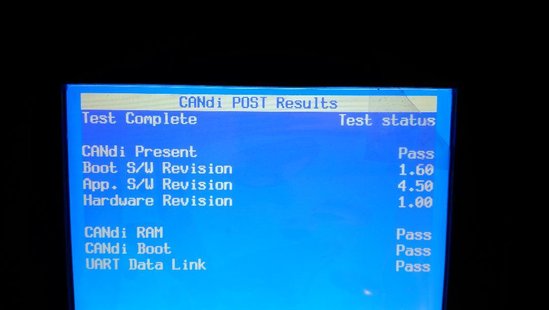
CANdi module shows up at boot screen.
get-gm-tech2-candi-module-to-work-04


Green LED flashes about once every second.
get-gm-tech2-candi-module-to-work-05


Diagnostic screens for CANdi now present. Hit ENTER, 4, 7 to get to this screen.
get-gm-tech2-candi-module-to-work-06


POST Results.
get-gm-tech2-candi-module-to-work-07

Self Test Results.
The weird looking screen is because I have not removed the protective plastic yet.
get-gm-tech2-candi-module-to-work-08


http://blog.obd2shop.co.uk/how-to-get-gm-tech2-candi-module-to-work/


Friday, 8 December 2017

GM Tech2 Diagnostic Scanner instructions

GM Tech2 Description: 
The Tech-2 is the same tester GM Technicians use to diagnose GM vehicles. The Vetronix Tech 2 comes with Authentic GM software and provides support for on-board diagnostics on all GM systems 1992 thru 2011.
Car model supported: GM/SAAB/OPEL/SUZUKI/ISUZU/HOLDEN

Tech2 Specification:
1) Dimensions: 12
2) Microprocessor: 32 bit,16 MHz
3) Memory: 32 MB flash type II PCMCIA. Type III slot available for future expansion.
4) Communications: Integral RS232 communication port.
5) Screen: 3.8.8 backlit monochrome with full graphics capability: 320,40 pixels. Displays up to 9 vehicle parameters at once .Download Tech2 Brochure (5.2 Mb)

Tech2 Features
1) Authentic GM software in the Tech 2 Flash means the most comprehensive diagnostic software available for late model GM vehicles.
2) Support for on-board diagnostics on all GM systems 1992 thru 2011.
3) Removable hardware modules provide insurance against scan tool obsolescence.
4) Large, easy-to-read backlit screen.
5) RS232 & RS485 ports provide the avenue to connect future devices to your Tech 2 Flash.
6) Ability to capture stored DTCs, Freeze Frame, and Failure Record for later review.
7) Ability to view the status of vehicle diagnostic tests as they run.
8) Bi-directional The authentic GM 1992-current year software will provide full bi-directional control when performing power train, chassis, and body diagnostics.

An industry change in protocol from OBD II to Controller Area Network (CAN) has begun. In order to perform diagnostics on a vehicle that uses the CAN interface; you will need the Tech 2 Flash and a CAN diagnostic interface module. The module connects between the Tech 2 Flashs diagnostic link cable and the OBD adapter. Once the module is connected, it can be used on all GM vehicle applications,even those vehicles using other platforms such as OBD I and OBD II.

The Following GM Vehicles Utilize The CAN Interface
05 Buick Allure (3.6L)
05 Buick LaCrosse (3.6L)
05 Buick Rainier (5.3L)
04-05 Buick Rendezvous (3.6L)
04-05 Cadillac CTS (3.6L)
04-05 Cadillac SRX (3.6L / 4.6L)
04-05 Cadillac XLR (4.6L)
05 Cadillac STS (3.6L / 4.6L)
05 Chevrolet Cobalt (2.2L)
05 Chevrolet Corvette (6.0L)
05 Chevrolet Equinox (3.4L)
05 Chevrolet TrailBlazer (5.3L)
05 Chevrolet SSR (6.0L)
04 Chevrolet Malibu (Body/Chassis only)
05 Chevrolet Malibu (3.5L)
05 GMC Envoy (5.3L)
05 Pontiac G6 (3.5L)
05 Pontiac GTO (6.0L)
05 Pontiac Pursuit (2.2L)

GM Tech2 Package List:
Tech-2 Flash Tester
32 MB PCMCIA Card with GM OE Applications
CAN diagnostic interface module(Candi) and instruction sheet download (199.2 kb)
RS232 cable and user manual
RS232-DB9 adapter
DLC Cable, DLC Loopback Adapter
12V Cigarette Lighter Power Cable
SAE 16/19 Adapter
NAO 12/19 Adapter
Battery Power Cable
Storage Case
gm-tech2


Notice:
  
1. It Can Only Support 12V Cars, No Trucks
2. One Device only Has One 32MB Card As Default, If You Want do more vehicles, Please Buy Additional 32MB Memory Card
3.The TIS2000 including is without usb key version, please need buy the usb version ( Item SO01 and SO01-B) in our website


Friday, 27 October 2017

Where is the best place to buy a clone GM tech2?

Today, I visit http://www.saabcentral.com/forums/ and read an interesting topic: Where is the best place to buy a clone GM tech2? a reliable site or Ali or ebay?
I think it is something helpful to the newbie who are looking for GM tech2, so I'd like to put together some typical posters' reviews. I declare all posts are original not by modified.

1. I bought my Tech2 from this site. They charge more than the sellers on AliExpress but I was able to use PayPal and had no issues with payment or shipping (got the package a week after I ordered it). I certainly wouldn't want to send copies of my driver's license/ID to buy something online.
http://www.obd2shop.co.uk/wholesale/cheap-tech2-with-caton-box-with-card-d.html


2. I have recently purchased a tech 2 clone with 148. Downloaded all the software I found on the site and have a working tech 2 with security access. I have done DRL turn offs through the reading and knowledge of gturner's help and experiments. I successfully replaced a bad ecu with a stage 1 I received from MPS and now have a damn good car. This site rocks I have obtained a lot of knowledge from all the guys that have been experimenting. I live in Texas near Houston and was stuck out do to no place to get the change done except through a GM stealership who would have charged me 7 to 800 because it had to be an ecu they got, labor, and usage of the tech2 and tis.

3. So I got the TECH 2 on Friday on eBay and spent the weekend with it. All is good and works great. Super quick to respond and it got here in great time. I ordered it without a case because I have old plastic tool boxes and foam so I'm just gonna DIY a case for it. The only gripe I have is with the connectors. then need some modifying in order to clip in and stay locked in place.

4. I can use my tech2 clone from aliexpress to everything on my three 9-5 from -99, -00 and -01. I haven't experienced anything that stops me from using the Tech2 at it's full capacity.

I have programmed keys and remotes which must be security related. The Tech2 has never been connected to a computer in any way. 

To sum up:
Where is the best place to buy GM tech2, it depends on not only price, but also payment option, shipment, after-sales customer service & tech support. More importantly, is it working as it claims. 


Tuesday, 24 October 2017

GM Tech2 Customers' Review: Good

The following are some obd2shop.co.uk customers' reviews on GM Tech2 scanner.
gm tech2 scanner


Wonderful! All in good packages, fast delivery! Seller send us the OPEL V148 software free download, I am thinking how to put to the card

Tech2 package including TIS2000, no need buy alone!

Received quickly.

2 pcs ship to USA, please best offer

Great transaction.

Everything I expected! And FAST shipping! Thank you!

Very impressed with this website, customer service very serious, patience , professional, they sent me the v44 file software do my old SAAB, a good website do business, 5 stars, recommend!

Recommend by my friend, ordered 1 pcs, tested well, would like to recommend to you, a reliable seller

thanks very much this seller a very good man, you can deal him to purchase the product

Fast Shipping. Tech2 as described, comes with TIS2000, I used tested on my OPEL vehicles, works great. Thanks.

Tech2 scanner works great. Saved me lots of money!

The excellent transaction would trade again with this merchant. Highly reliable

Thank you. I received the gm tech2 well. Recommended!

Wonderful! a great GM Tech2~

Good seller, Last year they promised us send one more card, last week we bought 1 pcs tech2 , got 2 pcs card, one Suzuki and 1 OPEL card. Really appreciate they remember !
Good seller recommend you all !

Perfect Tech2, seller also send the TIS2000 with usb keygen,all working fine

goods of high quality everything works. there was only a problem with delivery I asked my neighbour help pick up the package. All ok

Amazingly fast delivery just 9 days from placing order to package in my hands, Seller Use UK Special Line ship the package , NO TAX !. Tech2 is as described, all included!

Works perfect! A lot of choice for card, I choose OPEL English card and does exactly what I espected on my Vauxhall !

This tech2 is good. Work fine, but I ordered wrong card, should be OPEL card, I ordered GM Card. that's fine, my friend need GM card,I gave my hard to him and bought a new OPEL Card

my Candi arrival broken, seller keep their promise change a new replacement one,the new package arrival within 7 days by UK local post, no problem working like a charm.
Good seller they are , recommend to you all , buy from here!

Very fast shipping! It took only two weeks to deliver in Saint-Petersburg. Good packing. Tech2 as described. Works fine! Very good seller. Recommend!!!

Working good, seller send the TIS2000 with usb keygen as promised,and also the gift ELM327 they promise me 3 moth ago!Very impressed

Seller shipped with Germany Special Line , package arrival within 9 days, what's more No Tax. If you are a customer from Germany, ask them ship Germany way or Yanwen express, Never DHL !

Very good seller, very professional. If you have questions, always ready to respond. Finds solutions and provides concrete solutions. Thank you very much.

Thank you. Recommend seller. there including GM Tech2, tis2000, 32 mb card , all adapter including! Card checked - works perfect!

Works fine with Psg16, thank you very much will order another one. great seller! quickly and efficiently!


Sunday, 1 October 2017

How to upload captured data by GM TECH2 TIS2000

Topic:  How to upload captured data by using GM TECH2 TIS2000 scanner.

I hope TIS2000 can give more useful info regarding troubleshooting on C5 than a coloring book .
The Tech2 can record snapshots ( two I think) of a number of parameters. These snapshot recordings can be started by a DTC or manual started pressing the Tech 2 keypad .
These snapshots can later be uploaded from Tech 2 to the PC with TIS2000 and replayed as shown on the sceendump below.

 It’s a neat feature for someone who doesn’t have another way to do a datalog.
Sure was worth the money I spent.

www.obd2shop.co.uk

Thursday, 14 September 2017

GM Tech2 Diagnostic Scanner Descriptions

If you are looking for a car diagnostic tool, you could think of GM Tech2 Scanner. This post will offer more information about it.

Tech2 scan tool Features

1) Authentic GM software in the Tech 2 Flash means the most comprehensive diagnostic software available for late model GM vehicles.
2) Support for on-board diagnostics on all GM systems 1992 thru 2011.
3) Removable hardware modules provide insurance against scan tool obsolescence.
4) Large, easy-to-read backlit screen.
5) RS232 & RS485 ports provide the avenue to connect future devices to your Tech 2 Flash.
6) Ability to capture stored DTCs, Freeze Frame, and Failure Record for later review.
7) Ability to view the status of vehicle diagnostic tests as they run.
8) Bi-directional The authentic GM 1992-current year software will provide full bi-directional control when performing power train, chassis, and body diagnostics.

Tech2 Specification:

1) Dimensions: 12
2) Microprocessor: 32 bit,16 MHz
3) Memory: 32 MB flash type II PCMCIA. Type III slot available for future expansion.
4) Communications: Integral RS232 communication port.
5) Screen: 3.8.8 backlit monochrome with full graphics capability: 320,40 pixels. Displays up to 9 vehicle parameters at once. Download Tech2 Brochure (5.2 Mb)

GM Tech2 Package List:

Tech-2 Flash Tester
32 MB PCMCIA Card with GM OE Applications
CAN diagnostic interface module(Candi) and instruction sheet download (199.2 kb)
RS232 cable and user manual
RS232-DB9 adapter
DLC Cable, DLC Loopback Adapter
12V Cigarette Lighter Power Cable
SAE 16/19 Adapter
NAO 12/19 Adapter
Battery Power Cable
Storage Case
TIS 2000 CD
gm-tech2


How to Configure GM MDI 2 Wireless Connection Settings?

This is a guide on how to configure GM MDI 2 Multiple Diagnostic Interface wireless connection settings. 4 steps to easy finish. 1. Connect ...